




When Sony released the PlayStation 5 in 2020, the lack of expandable storage was a major downside. However, with a software update released less than a year later, users can now expand their console’s storage. This is especially important due to the increasing size of game installs. The default 667GB of space on the PS5 may have been sufficient in its first year, but in 2024, it’s definitely limiting.
Fortunately, a standard PCIe Gen4 x4 M.2 NVMe SSD can solve all your PS5 storage problems. If the technical jargon sounds overwhelming, fear not; it’s not as complex as it seems. For those looking for the best PS5 SSD options, they are listed right at the top.
When it comes to selecting the best PS5 SSD in 2024, there are several top contenders. Let’s take a closer look at some of the leading options:
Best PS5 SSDs in 2024

Corsair
Capacity: Up to 8TB | Sequential read performance: 7,100MB/s | Sequential write performance: 6,800MB/s | Connection: M.2
The Corsair MP600 Pro LPX is a top choice for the best PS5 SSD, offering excellent performance with read speeds of up to 7,100MB/s. It comes with a pre-installed heatsink and a five-year warranty, making it a reliable option. Despite not being the fastest NVMe on the list, the MP600 is affordable and practical for users looking for a hassle-free storage solution.
Pros
Built-in heatsink, Affordable
Cons
Not the fastest Gen4 model
$95 at Amazon
Crucial
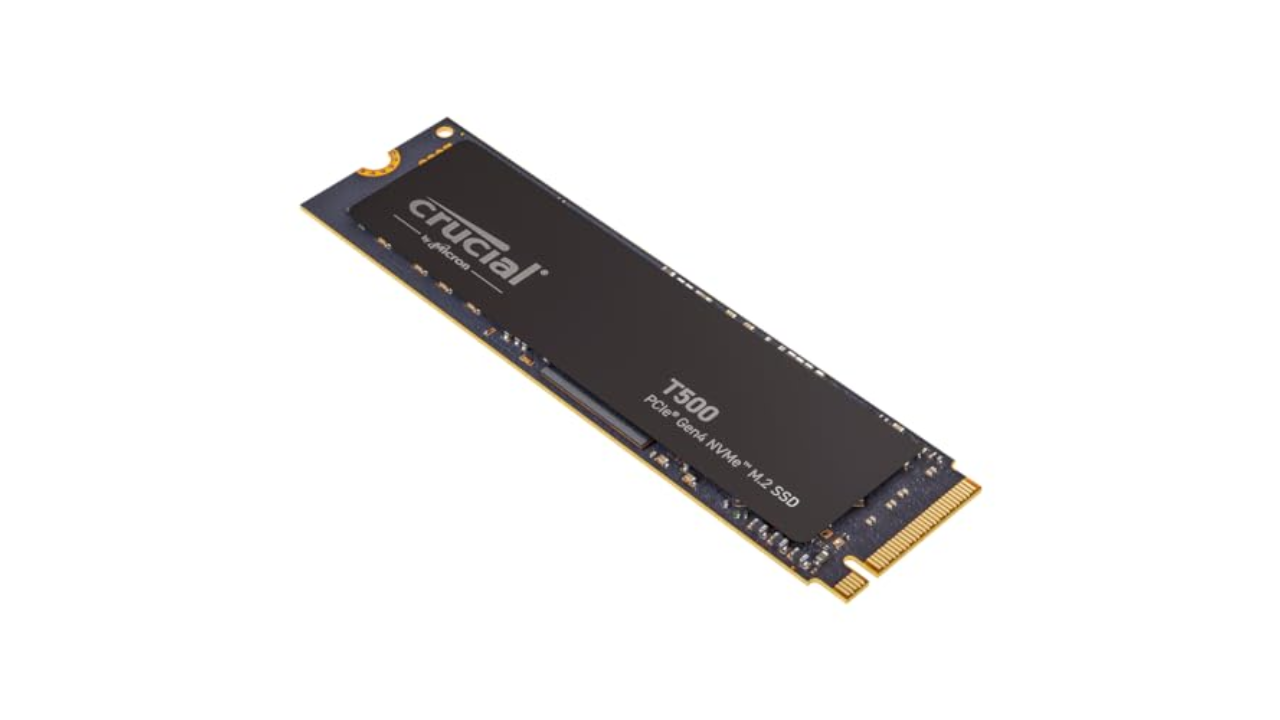
Capacity: Up to 4TB | Read performance: 7,300MB/s | Write performance: 6,800MB/s | Connection: M.2
The Crucial T500 is a cost-effective option if you’re looking to save money by installing your own heatsink. With read speeds of up to 7,300MB/s, it meets Sony’s technical requirements and offers good value. You can often find the 1TB model on sale for around $60, making it a budget-friendly choice. Whether you opt for the heatsink version or not, the Crucial T500 is a reliable option for expanding your PS5 storage.
Pros
Fast, Available with or without heatsink
$82 at Amazon
Sabrent
Capacity: Up to 8TB | Sequential read performance: 7,000MB/s | Sequential write performance: 6,600MB/s | Connection: M.2
The Sabrent Rocket 4 Plus offers a unique heatsink design specifically for the PS5. It boasts good performance and cooling, although it may be more expensive compared to other options. The 1TB variant costs around $130, while the 2TB model falls between $230 and $280. Despite not being the fastest or most affordable option, the Sabrent Rocket 4 Plus is a solid choice for users seeking reliable PS5 storage expansion.
Pros
PS5-specific heatsink design
Cons
Not as fast as other options, Expensive relative to other drives
$130 at Amazon

Samsung
Capacity: Up to 4TB | Read performance: 1,050MB/s | Write performance: 1,000MB/s | Connection: USB 3.0
The Samsung T7 is a reliable external drive option for storing games that you’re not currently playing. While you can’t play PS5 games directly from an external drive, you can store older PS4 games or other content. The T7 offers fast file transfers at 1,000MB/s and is available in a rugged variant for added durability. Samsung’s T9 model boasts even faster read/write speeds of up to 2,000MB/s, making it a great choice for at-home use.
Pros
Affordable, Reliable, Rugged variant available
Cons
Can’t play PS5 games from external drive
$70 at B&H Photo

How we test PS5 SSDs
Having maintained this guide for the past two years, I’ve personally tested most of the SSDs recommended for use with the PS5. Additionally, I have purchased and used our top pick in my own PS5 console.
How much PS5 storage do I need?
The PlayStation 5 can accommodate internal drives ranging from 250GB to 8TB in capacity. If you already own a PS5, you likely have an idea of your storage needs based on your game library. However, if you’re purchasing an SSD for a new PS5 or someone else, gauging the necessary storage for optimal performance can be challenging.
On average, PS5 games are slightly smaller than their PS4 counterparts, typically ranging from 30GB to 100GB in size. However, certain games, such as Call of Duty titles, can require up to 250GB of space. As a general rule, the PS5 internal storage can accommodate six to ten games before running out of space. It’s essential to consider your internet speed as well, particularly if you’re in an area with slow broadband where re-downloading games can be time-consuming.
When it comes to selecting an SSD for your PS5, a 250GB drive may not be the most practical choice due to its limited storage capacity. A 500GB or 1TB drive would be more suitable, offering ample space for modern games without breaking the bank. However, 2TB drives are also an option, providing slightly more savings per gigabyte and added flexibility.
While the PS5’s 825GB internal storage offers around 667GB of usable space, adding a 1TB PS5 SSD would essentially double the available storage for games. It’s worth noting that all recommendations provided in this article are compatible with the PS5 Slim and PS5 Pro models.
Can you play PS5 games on an external SSD?
External hard drives are a cost-effective alternative to internal SSDs and can be used to store PS4 games or PS5 titles for future use. While you can’t play PS5 games directly from an external SSD, you can transfer games back and forth between the external drive and your console. Opting for an SSD over an HDD will offer improved transfer speeds and load times, with models such as the Crucial X9 Pro and Samsung T5 being reliable options.
Which SSD cards are compatible with the PS5?
The PS5 supports M.2 Socket 3 (Key M) Gen4 x4 NVME SSD cards, but there are specific requirements to ensure compatibility. Drives must be capable of sequential reads at 5,500MB/s, although the PS5 may accept slightly slower speeds. Cooling and physical dimensions are also critical factors to consider when selecting an SSD for your PS5.
In terms of size, most SSDs will fit the PS5’s slot, which can accommodate 22mm-wide drives of varying lengths. Cooling is essential, and SSDs require effective heat dissipation with a cooling structure, such as a heatsink. When shopping for an SSD, ensuring it meets the recommended dimensions and cooling requirements is crucial.
When installing an SSD in your PS5, it’s important to follow the manufacturer’s guidelines and use the recommended tools. Sony recommends using a #1 Phillips or crosshead screwdriver for the installation process. Here’s a step-by-step guide:
How to install an SSD into your PS5
- Power down your PS5 and remove the stand to access the underside.
- Locate the drive bay, remove the screw holding the metal cover, and access the drive bay.
- Slot in the SSD at the edge closest to the number “30,” ensuring it fits correctly.
- Screw the drive bay back in place, reattach the metal cover, and slide the plastic outer shell back on.
Upon turning on your PS5, you’ll be prompted to format the new drive. Once completed, your console’s storage will be expanded, allowing you to download and move games to the new SSD.
Conclusion:
Expanding the storage capacity of your PS5 is essential for gaming enthusiasts who enjoy a wide variety of games. By selecting a compatible SSD and following the installation process, you can significantly enhance your gaming experience and avoid storage limitations.
For more trending news articles like this, visit DeFi Daily News.